
FAB Balance Check: 8 Easy Ways to Check Your Balance (App, ATM, Online & More)
Want to know about your FAB balance quickly and easily? Want to view your balance with and without internet access? If so, then this latest guide offers 8 super-fast and secure methods for your balance inquiry, and luckily, some of them don’t even require an internet connection.
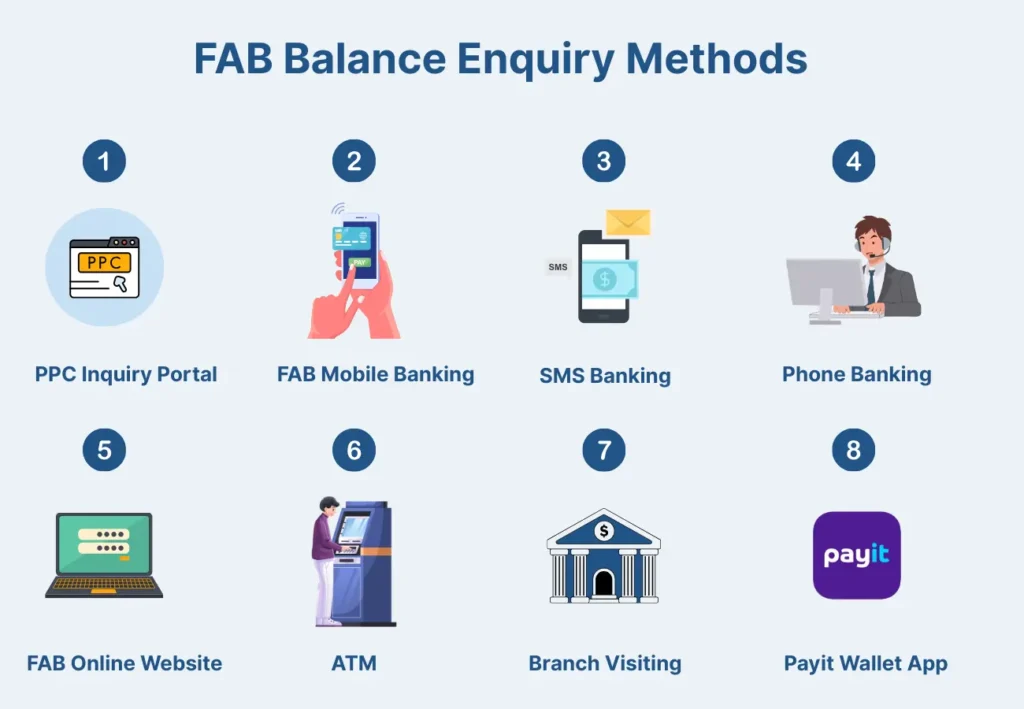
These 8 methods include the FAB Mobile app, FAB online website, PPC inquiry portal, SMS, helpline call, phone banking, and Payit wallet app.
Most importantly, they work remarkably well for all FAB customers—whether you use a Ratibi card, FAB Prepaid card, Credit/Debit card, the salary account, or even a legacy NBAD bank account.
So, enough intro, let’s get straight into our guide on checking the FAB balance.
8 Super-Fast and Step-by-Step Ways to Check Your FAB Balance
The following are the instant and easy ways you can use to check your FAB Balance:
Method 1: FAB Balance Check Using the PPC Inquiry Portal (fastest method)
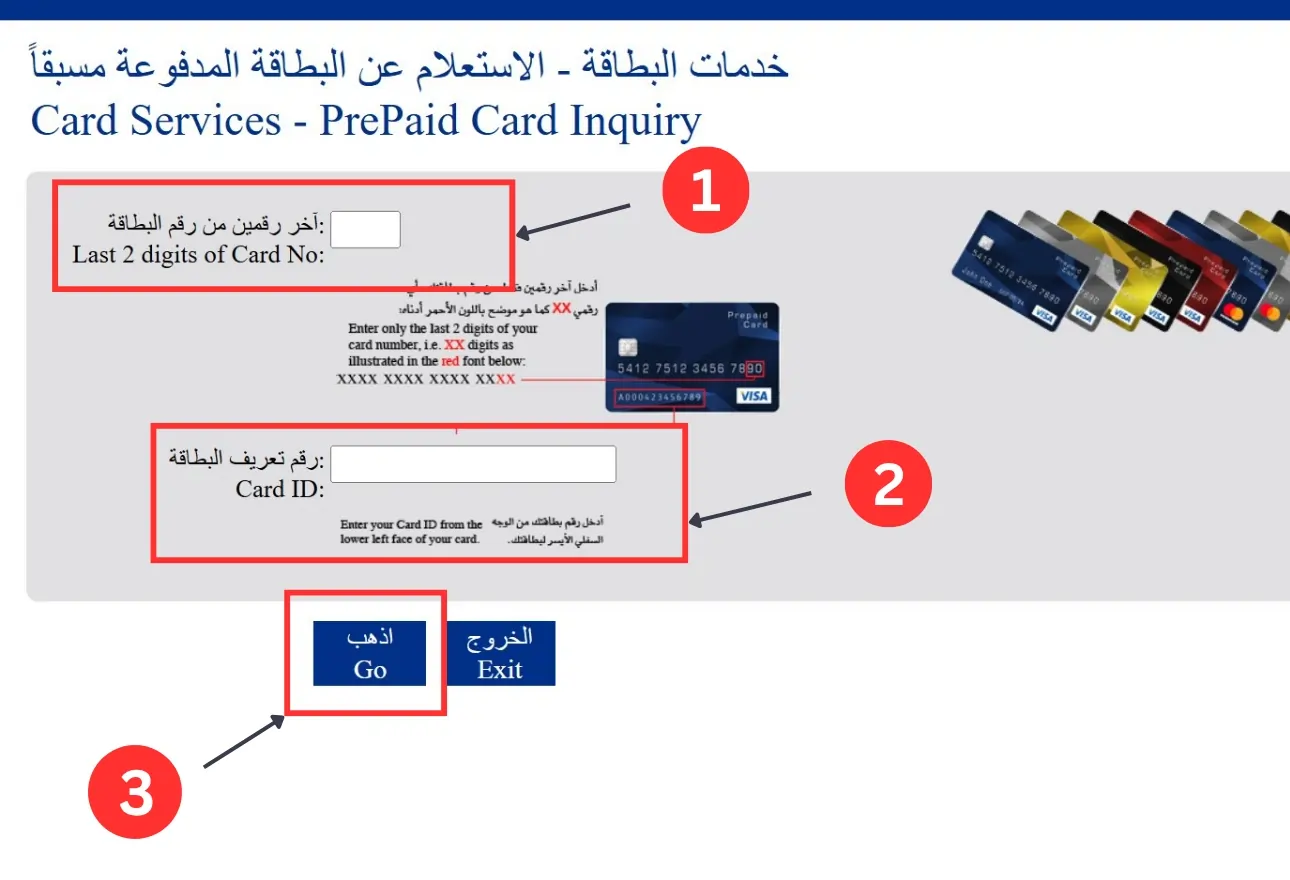
If you’re a FAB Prepaid cardholder (Ratibi or any other prepaid card), then using the PPC Inquiry portal (also known as “PPC Magnati”) for checking your FAB balance is the fastest and easiest option.
Steps:
1. Go to Site: Open Prepaid Card Inquiry (PPC) website —> PPC Magnati
2. Enter Digits: In the 1st box, type in the last 2 digits from your prepaid card number.
3. Enter Card ID: In the 2nd box, type in your Card ID number.
4. Click on the “Go” button and see your balance.
If you prefer a dedicated guide on prepaid card balance check, check out our detailed guide on the Ratibi Card Salary Check.
Method 2: FAB Balance Check Using the FAB Mobile App (Don’t Miss This Method)
Steps:
- Install the FAB Mobile App:
- On Android: Google Play Store.
- On iPhone: App Store.
- On Huawei devices: Huawei AppGallery
- Log in or Sign up:
- Login (existing user): Mention your username/email and password to log in.
- You may have to enter the OTP code if it is sent to your email or phone number.
- Login (existing user): Mention your username/email and password to log in.
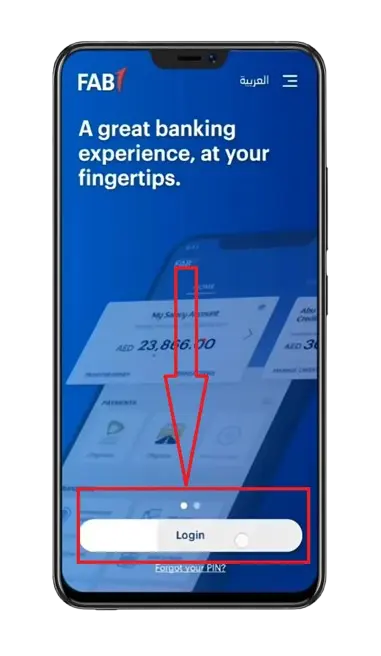
- New User of the App (Register): The Login button is not visible? You may not be registered with FAB Mobile Banking.
- Click on “Already a customer” and follow the next instructions to register.

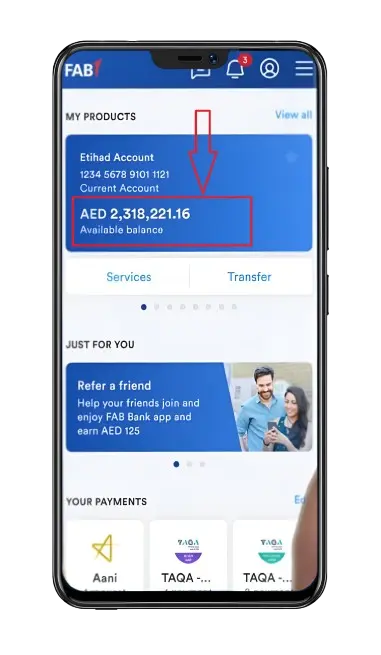
- See Your Balance:
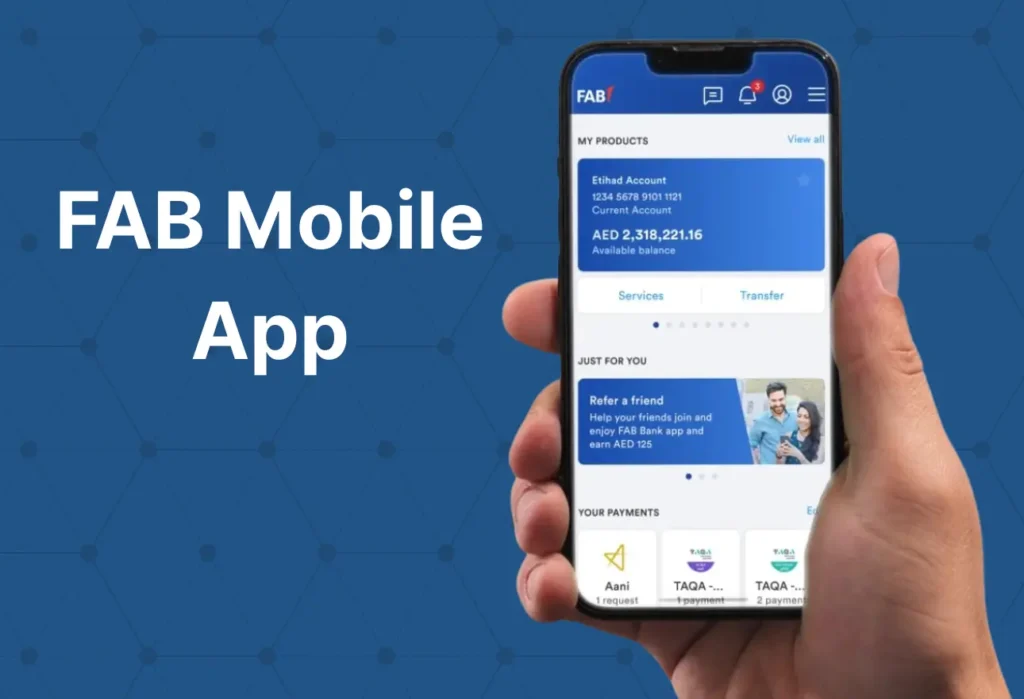
- View your available funds on the home screen.
- Is the balance not visible? Then, select your specific account in the “Accounts” menu.
- Always log out (optional): After checking your FAB balance on public or shared devices.
Method 3: FAB Balance Check via SMS Banking
If you don’t have an internet connection or are in a low-network area, you can still check your FAB balance using SMS banking.
But before we proceed to the actual steps, here we have some key points to keep in mind:
- Standard SMS rate may apply.
- Use only the registered mobile number(Etisalat or DU).
- You should contact FAB Customer Service to activate SMS Banking if it hasn’t already been done.
Steps:
- Registered Number: Check if your mobile number (Etisalat or du) is registered for the SMS Banking.
- Type the message: ‘BAL space <Enter the last 4 digits of your account number>’. Example: BAL 0101
- Send: From your registered number, send it to 2121.
- Receive Balance Message: Within a few seconds, an SMS containing your remaining balance will arrive at your registered mobile number.
Method 4: FAB Balance Check via Phone Banking (Works best for Non-Tech users)
If you’re stuck in a problem where you don’t have internet access, or you’re not a tech-savvy person, then the Phone Banking service is the easy option to check your FAB balance.

Steps:
- Call: Contact FAB Customer Support.
- For UAE Citizens: 600 52 5500.
- For Foreigners: +971 2 6811511.
- Speak: Speak with the Virtual Agent naturally.
- Instructions: Listen to the IVR (Interactive Voice Response) instructions carefully and follow them.
- Make a Request: Request the agent that you want to inquire about the balance.
- Verify yourself: By providing your account details.
- Hear your balance: After completing the process, you will receive your available balance information during the phone call.
FAB Virtual Agent—A Super Important Thing to Know
Suppose you want to talk to a human. In that case, FAB Virtual Agent (a new feature with multi-factor authentication) will automatically understand your service nature and suggest the best solution, whether through self-assistance or a Customer Service Agent.
So, the system voice talking to you during the phone banking method is actually this AI agent. Therefore, it’s up to the AI agent to decide whether you should be connected to a human agent or not.
Although that’s an easy option, it has some drawbacks, such as detailed verification questions and long call queues during peak hours. So, make sure you use this method when you have enough time.
Method 5: FAB Balance Check Online (Official Website )
Steps:
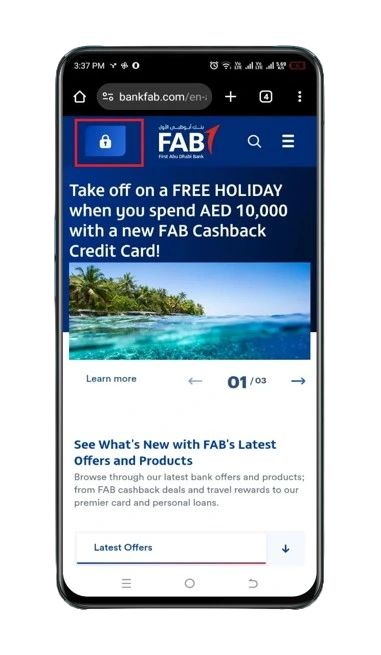
- Visit the official site: FAB Bank Online Portal –> FAB Bank
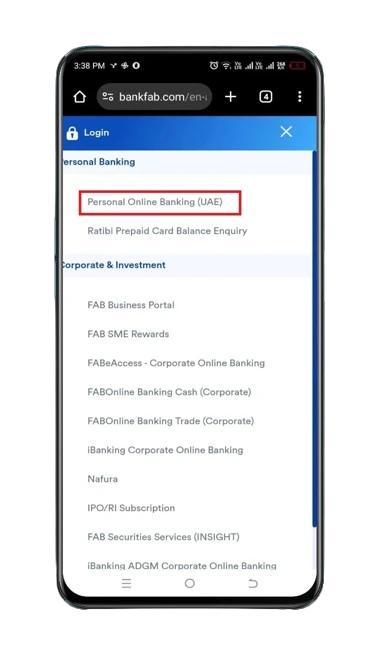
- Tap on Login: Click on the “Login” Button at the top-left corner.
- Select Personal Online Banking (UAE): Under the “Personal Banking” section, select “Personal Online Banking (UAE)”.
- Login or Register:
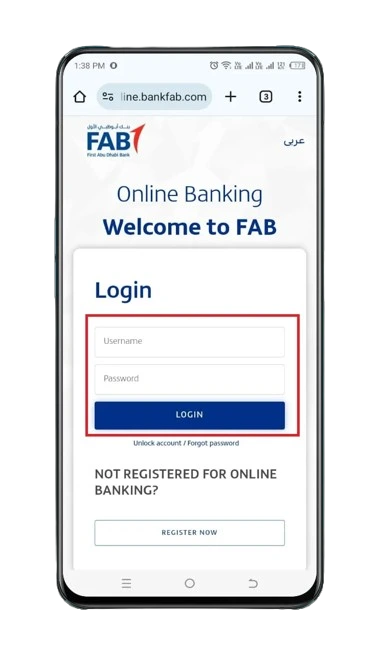
- Login (existing user): Fill in your login details—username & password—and touch the “LOGIN” button.
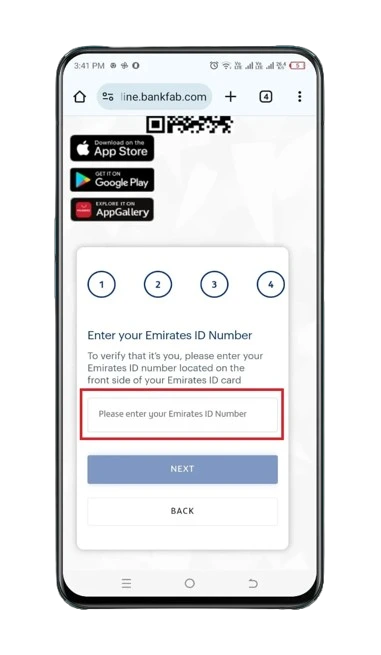
- Register (new user): Click on the “REGISTER NOW” button and follow the next steps to register.
- Remaining Amount: See the current balance on the screen.
- Don’t see the balance? From the menu, click on the “Accounts” tab and select your relevant account to know your available FAB balance.
- Log out (optional): If you’re using someone else’s mobile device or laptop/PC, consider logging out for security.
Method 6: FAB Balance Check Using an ATM (With Screenshots)
Checking your First Abu Dhabi Bank balance in real-time using an ATM is the best method if you are in an area with no internet coverage, are offline, or are a cardholder.
And for a free balance check, head over to the FAB ATM. Others may charge a fee.
Steps:
- Visit ATM: Go to your nearby FAB ATM.
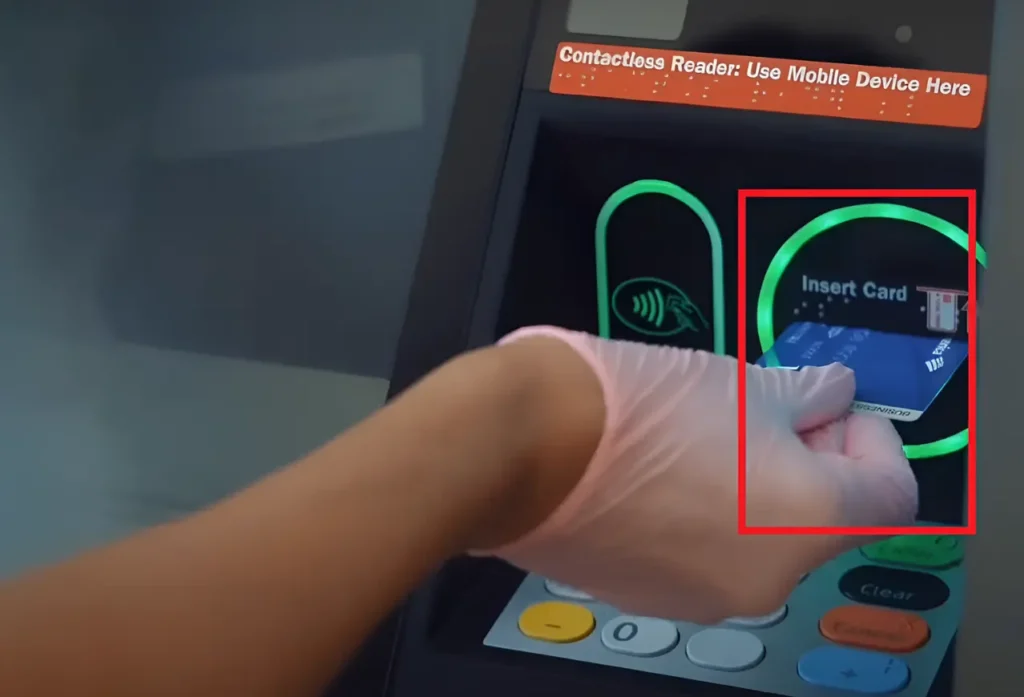
- Insert Card: Put your FAB card—whether it’s a credit, debit, or prepaid card.
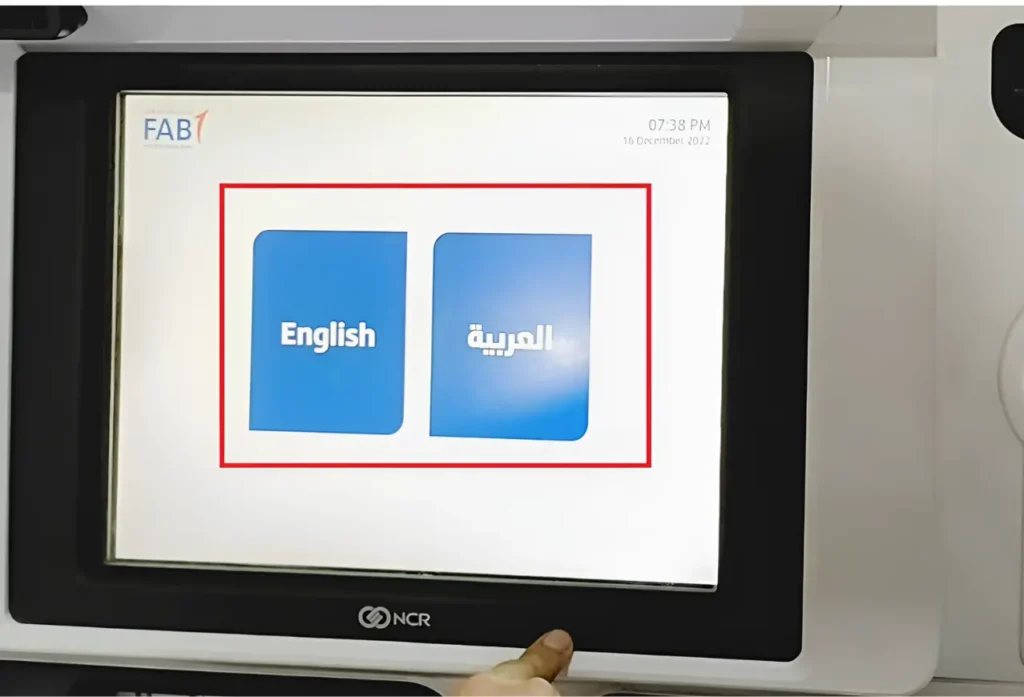
- Pick the Language: You have two options—English & Arabic—to choose from.
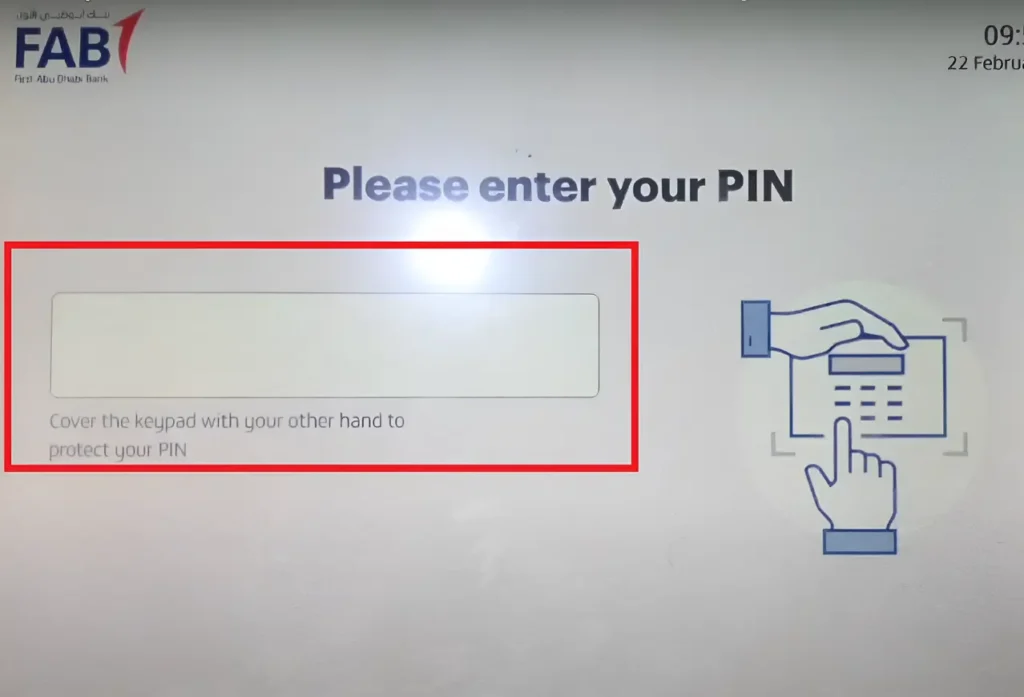
- Enter PIN: Enter your 4-digit PIN (Personal Identification Number) code.
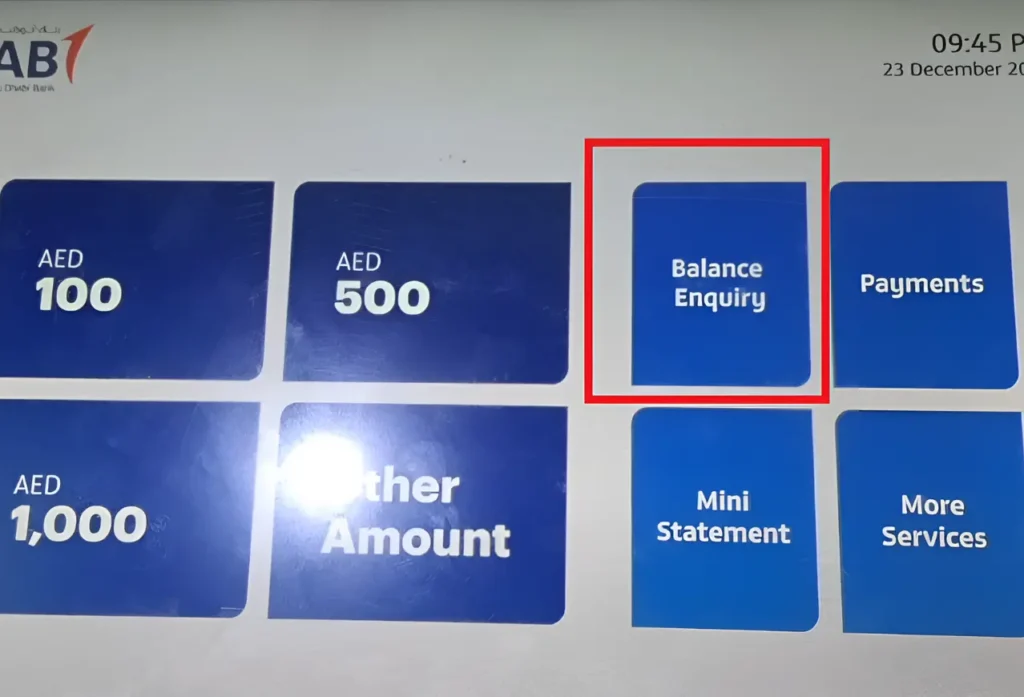
- Touch the” Balance Inquiry”: Click on the ‘Balance Inquiry’ option to continue.
- Touch the “Display On Screen: If you want to view your FAB balance on the screen.
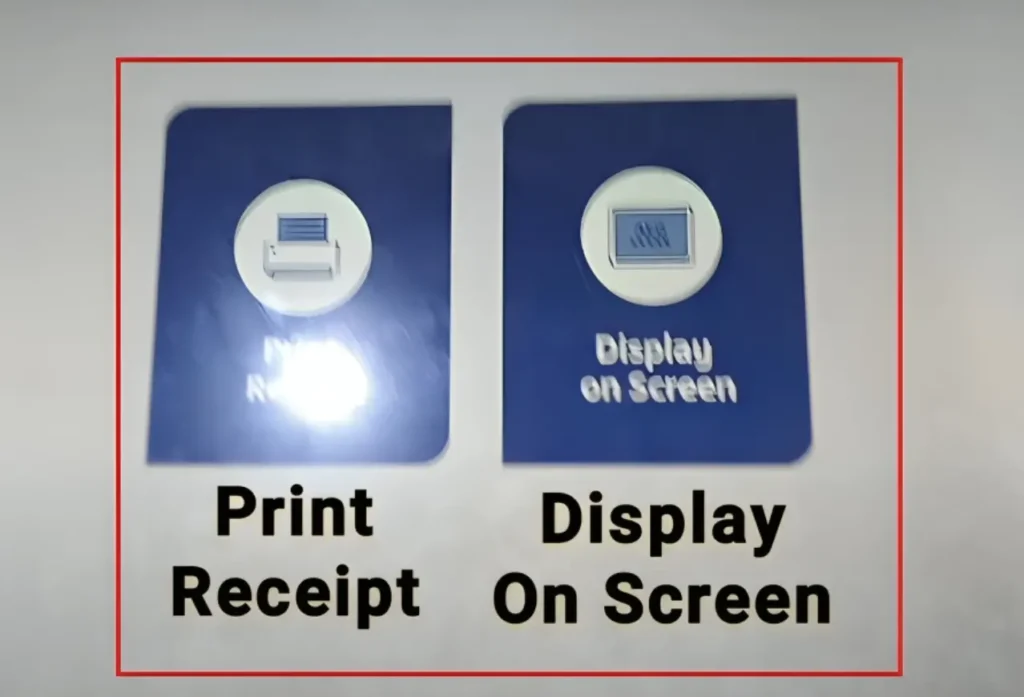
- Your Available Balance: You can view your balance on the ATM display.
- Print Balance Receipt (optional): For those who prefer a hard copy.
- Remove the Card: Always remove your card from the ATM before leaving the area.
Pro Tip: Use the FAB “Branch and ATM Locator” tool to find a nearby ATM
Method 7: FAB Bank Balance Check at the Branch
Steps:
- Visit the Branch: Go to your nearby FAB branch.
- Bring the Necessary Documents: The required documents are your Emirates ID and a valid FAB Credit/Debit/Prepaid card for verification purposes.
- Talk to the Bank Person: Head over to the teller and request a balance inquiry.
- Get the Balance: Within a few minutes, you will be informed of your remaining amount.
Pro Tip: To find your nearby FAB branch, use the “FAB Branch and ATM Locator” tool.
Method 8: FAB Balance Check using the Payit Wallet App
If you are a frequent user of this app for daily online payments and transactions, then it will be the best option for inquiring about your FAB balance.
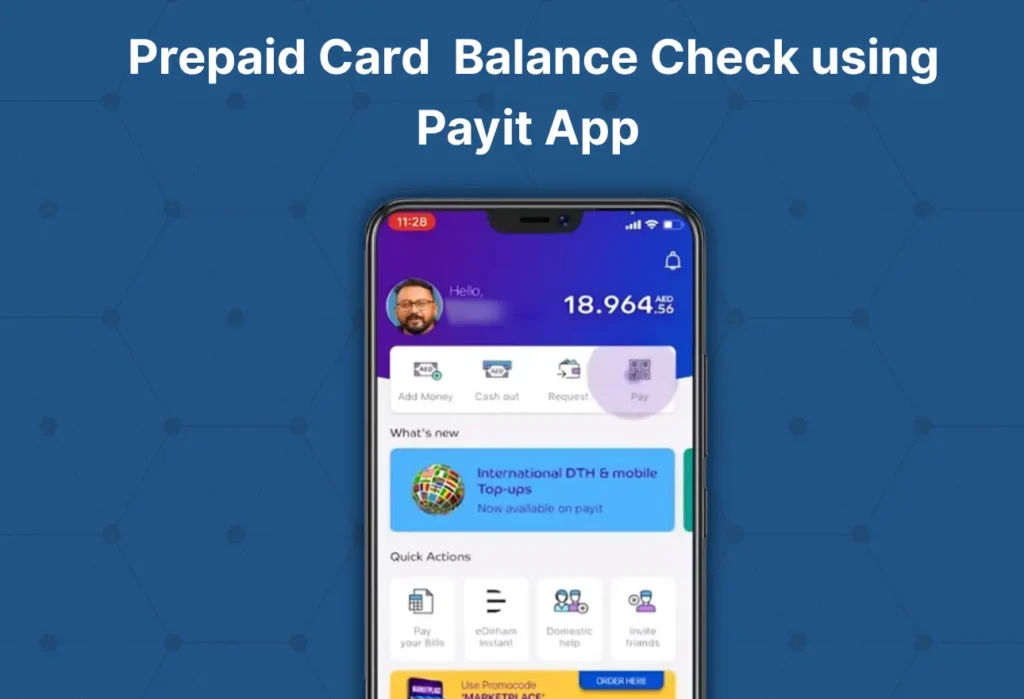
Here’s the thing: this method only works with FAB Prepaid cards, such as Ratibi, Nafees, PayPlus, DWALLET, Payment, Multi-Currency, and Gift, among others.
Steps to Check the Prepaid Card Balance using the Payit App:
- Install: Install the Payit Wallet App:
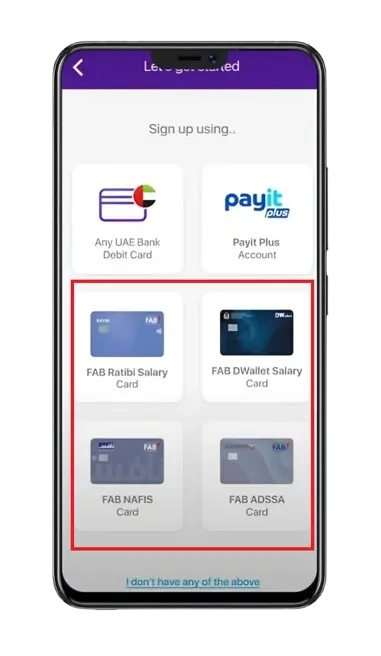
- Sign up: Select your desired FAB prepaid card—be it Ratibi(salary card), Nafis, ADSSA, DWALLET, etc.
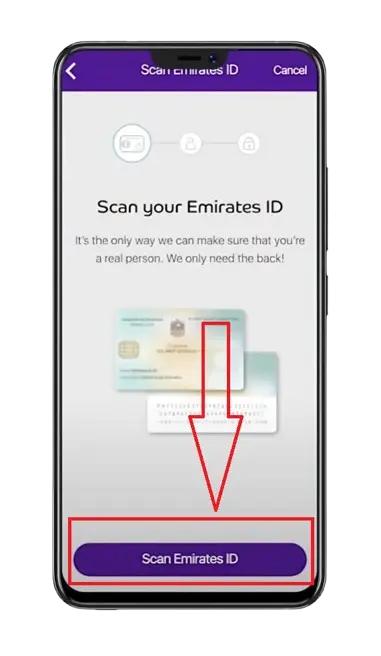
- Scan: Do a scan of your Emirates ID.
- Confirm Details: Check your Emirates ID details and click the “Confirm” button.
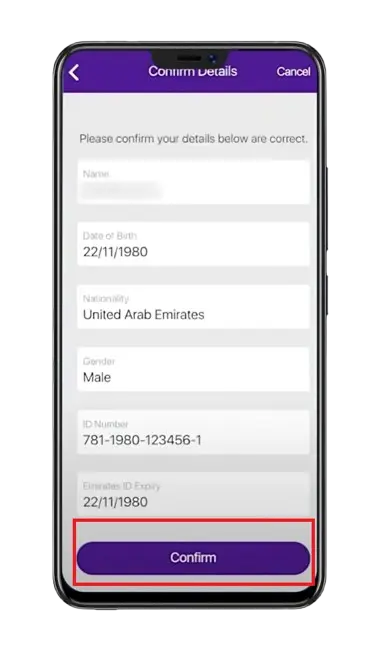
- Follow the next steps: Complete the remaining easy verification steps.
- Balance: View your funds on the Payit home screen:
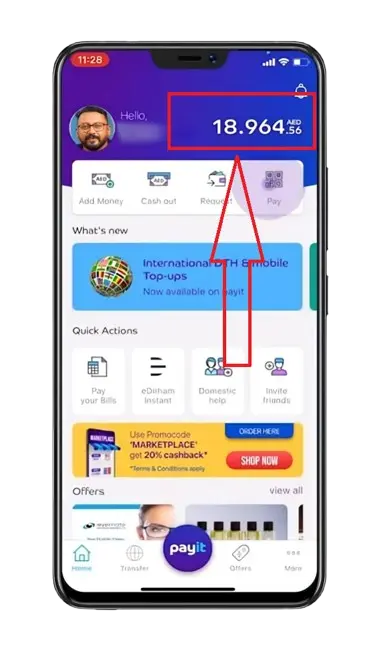
How To Check NBAD Bank Account Balance?
After the merging of FGB (First Gulf Bank) and NBAD (National Bank of Abu Dhabi) in 2017, which gave birth to FAB (First Abu Dhabi Bank), you can now check your NBAD balance using the same above methods that apply to FAB.
Moreover, through FAB services, you can check various types of NBAD balances, including account balances and PPC (Prepaid Card) balances, as NBAD is now part of FAB.
How to Check Ratibi Card Salary? A Video Tutorial
FAB Balance Check Methods for Every FAB Customer
Customer | Best Methods for Balance Inquiry | Important Note |
|---|---|---|
FAB Salary Account | The Payit app method can’t be used for the salary accounts. Visit this detailed guide on the salary account balance check. | |
Ratibi or any other Prepaid Card | The SMS banking method is slightly different for the Ratibi/Prepaid card. So if you’re checking your Ratibi card balance using SMS banking, then follow these steps:
| |
Credit / Debit Card Users | The slight difference in checking the credit/ debit card balance while using the Mobile App or Online Banking method is as follows: After you have logged into the FAB Mobile app or online banking, you simply have to head over to the “Card Management” section to check your card balance. | |
NBAD Users (now called FAB) | You have to use your NBAD login details. | |
International Users | SMS banking is not available for international users. You may be charged international call or data charges for phone banking. |
Comparison of First Abu Dhabi Bank Balance Check Methods
The following are the best, easiest, fastest, most secure, and most convenient ways to check your FAB balance.
Method | Mode | Charges | Processing Time | Useful Info |
|---|---|---|---|---|
Mobile App | Digital | Free | Instant | Requires internet access. Data charges may apply. |
Online Banking + PPC | Digital | Free | Instant | Requires an Internet connection. |
SMS Banking | SMS | Standard SMS rates | Some seconds | Best when the internet isn’t available. Charges are based on the SIM Company. |
ATM | Physical | Free at FAB ATMs (others may charge) | Instant | An easy way for a physical balance check. |
Phone Banking | Telecommunication | Standard phone call rates | Some minutes | Can be slow and time-consuming. |
Payit Wallet App | Digital | Free | Instant | Useful for Wallet users |
Branch Visiting | Physical | Free | Varies branch-to-branch | Useful if you need in-person help. Slowest method |
FAB Bank Balance Enquiry Errors & their Fixation
Login Issues: 🔑
1: Incorrect username or password.
Solution:
2: The Account gets locked
Solution:
3: OTP Not Received
Solution
4: Unregistered Mobile Number
Solution:
ATM Issues: 🏧
1. Balance isn’t showing
Solution:
2. The card isn’t recognised.
Solution:
3. ATM Swallowed the Card
Solution:
SMS Banking Issues: 💬
1. No reply.
Solution:
2. Message Failed to Send
Solution:
Mobile App Issues: 📱
1: The App is not opening. It got stuck. It crashes.
Solution:
Online Banking Issues: 💻
1. Website not loading. Session Expired
Solution:
Top Benefits of Regular Bank Balance Checks
1. Identify Suspicious Transactions and Keep Yourself Safe from Fraud
Regular tracking of balance can help you spot unauthorised or fraudulent activities such as:
2. Prevention from Overdrafts and Extra Charges.
It prevents overdrafts, bounced checks, unexpected charges, and other associated fees because you’re monitoring your funds regularly and using them cautiously.
3. Ensure Transaction Accuracy and Protect Your Finances
You can easily detect and mitigate unauthorised or suspicious activities by regularly checking your balance. As a result, your finances remain safe and secure.
4. Help you Detect Errors like Duplicate Transactions
Identifying duplicate transactions, which generally occur due to system or technical errors, becomes easier to spot with consistent checking.
5. Assist you in tracking and Staying Aware of Spending habits
It allows you to study and track your spending habits, helping you take informed financial and budget planning steps for future spending.
6. Effectively Reconciling Your Checking Account
Reconciling is the process of matching your transaction records with the bank’s records to settle any sort of mistake by you or the bank. By regularly reviewing your balance, you can avoid such potential issues.
7. Gets you a Strong Credit Score
By monitoring your available funds, you ensure that you spend and pay the due amount carefully, which further contributes to enhancing your financial profile. As a result, your credit score gets stronger and stronger.
What is First Abu Dhabi Bank (FAB)? An Overview
In 2017, two banks in the UAE—First Gulf Bank (FGB) and the National Bank of Abu Dhabi (NBAD)—combined to give birth to First Abu Dhabi Bank (FAB), which is now one of the top and most trusted banks in the United Arab Emirates.
Being an expert in personal and corporate banking, it offers a range of financial solutions, including digital banking, savings accounts, current accounts, prepaid cards, credit cards, debit cards, and loans.
Although it operates from Khalifa Business Park in Dubai, it has now expanded its network across 5 subcontinents.
Moreover, it has earned an AA rating in MSCI for its Environment, Social, and Governance (ESG) performance.
Types of FAB Bank Accounts
The following are the types of FAB bank accounts:
1) Savings Accounts
As the name suggests, it is a type of bank account that lets you save and grow your money. How? First, you deposit money, and then the bank gives you a decent amount of interest regularly. Hence, your savings continue to grow periodically.
Types of Savings Accounts:
2) Current Accounts
It’s a type of bank account used for everyday transactions by businesses and merchants. This account offers numerous perks, including travel benefits, FAB rewards, high liquidity, and free international transfers.
Types of Current Accounts:
3) Digital Salary Account (Payit Plus)
This is the best and all-in-one solution for those who want to conduct online shopping, make bill payments, cross-border funds transfers, and access certain banking services.
It offers the following benefits:
Top Benefits of Various FAB Bank Accounts in the UAE
Account Type | Free Debit Card | Free Lounge Access | Min. Balance Requirement | Currency Support | Additional Benefits |
|---|---|---|---|---|---|
Personal Savings Account | Yes (FAB Mastercard) | 4/year (Middle East) | Yes (AED 3000 or equivalent) | AED + major global currencies (USD, AUD, EUR, etc.) | N/A |
iSave Account | No | No | No | AED only | N/A |
Elite Savings Account | Yes (Elite World Mastercard) | No | No | AED + major global currencies | Tier-based interest on AED savings. |
Personal Call Account | No | No | Yes (AED 3000 or equivalent) | AED + major global currencies | Withdraw your funds anytime. |
Personal Current Account | Yes (FAB Mastercard) | Yes | Yes (AED 3000 or equivalent) | AED + major global currencies | First chequebook for free. |
FAB One Account | Yes (Platinum Mastercard) | Yes (On Platinum Mastercard at selected airports) | No | AED only | 4 Free ATM cash withdrawals across the UAE on a Debit card. |
Elite Current Account | Yes (Elite Gold World from Mastercard) | Yes (over 1,300 locations using FAB World Elite Debit card) | No | AED + major global currencies | No charge for your first international remittance per month. |
FAB Etihad Guest Account | Yes (Etihad Guest Platinum) | No | No | AED only | 4 free local funds transfers each month |
FAB Etihad Guest Elite Account | Yes (Etihad Guest Signature) | Yes | No | AED only | Unlimited chequebooks at no cost |
Requirements for Opening a FAB Bank Account
Although the requirements vary from account to account, the following are the basic requirements that apply to every account. For specific account requirements, you can contact FAB customer support, visit the website, or go to the branch.
Note: The bank team may also request additional documents if necessary.
How Can You Open a FAB Bank Account Online and Offline
First, choose the account you want to open, such as a current, savings, or salary account. Then, select the mode—offline or online—and follow the relevant step-by-step process below to open your account.
Website (online):
- Open the First Abu Dhabi Bank website and navigate to the specific account webpage (e.g., Savings, Current).
- Now, touch the “Apply now” or “Open your account” button.
- Complete the form and submit it.
Through Branch (offline):
- Visit the closest branch.
- Request for Account Opening (Please bring the required documents as well).
How Can You Register for FAB Online Banking?
- Navigate to the official FAB website and press the “Login” button, which can usually be found in the top left corner.
- Click on “Personal Online Banking (UAE)” under the ‘Personal Banking’ tab.
- Click on the “REGISTER NOW” button.
- Enter your CID, Credit, or Debit card number and click on the “I ACCEPT T&C” button
- Mention your Emirates ID and press the “NEXT” button.
- Complete the remaining 2 steps and get yourself registered.
How to Download the First Abu Dhabi Bank Statement via Mobile Banking?
- Open the FAB App
- After logging in, go to the home screen.
- Scroll up and click on “Services”.
- Click on “Download statements”.
- Select the range and download the statement.
Important Information
If you have enabled the “Get e-statement option”, you may have received a statement at your registered email address according to your set frequency.
The password to view your e-statement PDF is composed of an 8-digit number, which is in this format:
[Account number—only last four digits (XXXX)][Your date of birth in day and month format (DDMM)].
Example:
- Format: XXXXDDMM.
- Output: 22340408.
Pro Tip: You can also update your frequency by clicking on “Set statement frequency”.
How to Activate and Use the FAB Mobile Banking App?
- Install the FAB App.
- Login: if you have already registered on FAB Mobile Banking.
- Mention your details and touch the “LOGIN” button.
- Register: If you’re already a FAB customer but haven’t registered for the FAB Mobile app.
- Tap on the “Already a customer” option available under the “Join FAB” button.
- Mention your CID (Customer Identification Number), Credit card, or Debit card Number.
- Check the “terms & conditions box,” then click “Continue”.
- Follow the instructions displayed on the app screen to verify your identity.
- After this process, you will see the home screen.
- Explore the App Features:
- Card Icon: For different card-related services.
- Services Menu: For account and document(statements) management.
- Refer and Earn: Earn rewards by referring friends and family.
- Help and Support: For customer care.
- Branch and ATM Locator: A tool to find nearby ATMs or branches.
- Enable Biometric login: Get instant login access by activating FAB fingerprint or face-recognition login.
Here’s also a detailed guide on FAB Mobile Banking.
FAB Customer Support
General Customer Care Helpline Numbers
For UAE Folks: 600 52 5500
For International Customers: +971 2 6811511
Main Office:
First Abu Dhabi Bank
Al Qurm – Business Park
P.O. Box 6316
Abu Dhabi, United Arab Emirates
Customer Care Email:
Email: [email protected]
For more contact details, read this complete guide on FAB Customer Support
Conclusion:
This was all about how to check your FAB balance using the latest and easiest methods. If you have any queries or issues, please feel free to contact the FAB 24/7 support team. They are always there to help you resolve your every banking issue, whether it’s a balance check, ATM, or branch issue.